


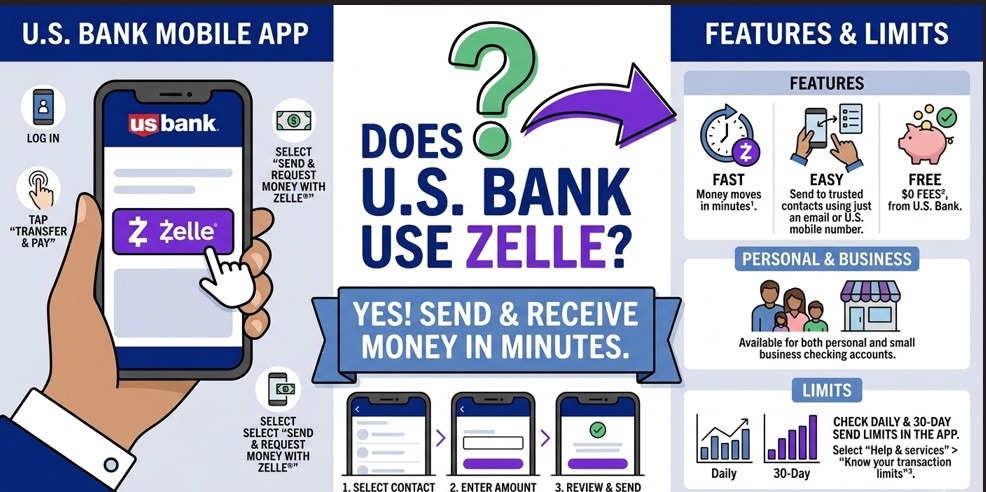
You need to send $800 to your landlord by end of day. Or split a contractor payment with your business partner. Or pay back a friend before they stop answering your texts. You open your U.S. Bank app — and you want to know one thing: is Zelle in here?
The short answer is yes. But if you stop there, you’ll miss the part that matters — the limits, the setup quirks, the differences for business accounts, and the one risk that trips up even experienced users.
This guide covers everything you need to know about using Zelle with U.S. Bank: how to get started, what you can and can’t do, how it stacks up against other transfer options, and how to protect yourself when things go sideways.
Quick answer — does U.S. Bank use Zelle?
Yes. U.S. Bank is a native Zelle partner with Zelle built directly into its mobile app and online banking platform at usbank.com. No separate download is needed. Enrollment requires a U.S. Bank checking or savings account plus a verified U.S. mobile number or email address. Transfers to enrolled recipients typically arrive within minutes, at no cost.
Table of contents
- What is Zelle — and why does the bank relationship matter?
- Does U.S. Bank support Zelle natively?
- Which U.S. Bank accounts work with Zelle?
- How to set up Zelle with U.S. Bank (step-by-step)
- U.S. Bank Zelle transfer limits explained
- Zelle for U.S. Bank business accounts
- U.S. Bank Zelle vs. wire transfer vs. ACH
- Is it safe? The honest answer
- Common issues — and how to fix them
- FAQ
- Final thoughts
What is Zelle — and why does the bank relationship matter?
Zelle is a real-time payment network that moves money directly between U.S. bank accounts — no digital wallets, no holding periods, no middlemen. You send money to a phone number or email address, and it lands in the recipient’s bank account, usually within minutes.
What makes Zelle different from Venmo or Cash App is ownership. Zelle is operated by Early Warning Services, LLC — a company jointly owned by seven of the largest U.S. banks: Bank of America, Capital One, Chase, PNC, Truist, U.S. Bank, and Wells Fargo.
That ownership detail matters more than most users realize. Because U.S. Bank helped build Zelle, its integration is not a third-party bolt-on. It’s native — meaning the feature is stable, well-maintained, and embedded directly in the bank’s own infrastructure.
Key definition
Native Zelle partner: A bank that has integrated Zelle directly into its own app and online banking platform, as opposed to routing users to the standalone Zelle app. U.S. Bank is a native partner, which means you manage everything inside your existing U.S. Bank account — no third-party login required.
Does U.S. Bank support Zelle natively?
Yes — and this is worth emphasizing. U.S. Bank doesn’t just “support” Zelle in a technical sense. As a co-owner of the Zelle network, U.S. Bank was involved in building it. The integration is as deep as it gets.
When you use Zelle through U.S. Bank, you are not leaving the bank’s app or redirecting to a Zelle-branded portal. Everything happens inside U.S. Bank’s interface. Your funds come directly from your linked U.S. Bank account and land directly in the recipient’s bank account — no intermediate step.
U.S. Bank has offered Zelle since the network’s consumer launch in 2017, and the feature has been continuously updated alongside the bank’s broader digital banking improvements.
Which U.S. Bank accounts work with Zelle?
Zelle is available on these U.S. Bank account types:
- Personal checking accounts
- Personal savings accounts
- Business checking accounts (with differences — see section below)
Zelle is not available on U.S. Bank credit cards, U.S. Bank prepaid cards, money market accounts used as investment vehicles, or brokerage or investment accounts.
Important detail
If you hold multiple U.S. Bank accounts, you select which account to link to Zelle during setup. One phone number or email address can only be registered to one Zelle account at a time — across any bank, not just U.S. Bank.
How to set up Zelle with U.S. Bank
First-time enrollment takes three to five minutes. Here is the full process:
- Download or open the U.S. Bank Mobile App.Available free on the App Store and Google Play. Log in with your existing U.S. Bank online banking credentials. If you bank through usbank.com instead, you can also enroll via the desktop portal.
- Find the Zelle entry point.From the home screen, tap “Send money” or navigate to “Transfer & Pay” in the bottom navigation bar. Zelle will appear as a labeled option within that menu.
- Start enrollment.Tap “Send with Zelle.” If you’ve never enrolled, you’ll be taken through a short setup flow before you can send your first payment.
- Enter and verify your U.S. phone number or email.This becomes your Zelle token — the identifier people use to send money to you. You’ll receive a one-time verification code to confirm ownership.
- Link your account.Select the U.S. Bank checking or savings account you want to connect. This is the account that funds will be drawn from and deposited into.
- Accept terms and finalize enrollment.Review Zelle’s terms of service. Confirm enrollment. You’re done — enrollment is usually instant.
- Send your first payment.Enter a recipient’s phone number or email, specify the amount, add an optional memo, and confirm. That’s it.
Recipient not enrolled?
The recipient does not need to bank with U.S. Bank — just with any Zelle-participating institution, or through the standalone Zelle app. If they are not yet enrolled, they’ll receive a text or email invitation. You have 14 days before the payment auto-cancels and your funds return.
U.S. Bank Zelle transfer limits explained
This is where many U.S. Bank customers run into surprises. Zelle limits are set by individual banks — not by Zelle itself — and U.S. Bank’s personal account limits are on the more conservative end compared to some peers.
| Limit type | Personal accounts | Business accounts |
| Daily sending limit | Up to $2,500 | Up to $2,500 (may vary) |
| Monthly sending limit | Up to $10,000 | Up to $20,000 |
| Per-transaction maximum | Up to $2,500 | Up to $2,500 |
| Receiving limit | No published cap | No published cap |
| Fee | Free | Free |
Limits may be adjusted by U.S. Bank based on account age, history, and risk profile. Verify your specific limits inside the U.S. Bank app or by calling 800-872-2657.
How U.S. Bank’s limits compare to competitors
Chase allows eligible personal customers up to $5,000 per day via Zelle. Bank of America’s limit varies by account type but can reach $3,500 daily. U.S. Bank’s $2,500 personal cap sits below both — which matters if you make frequent mid-size transfers.
If $2,500 per day isn’t enough for your use case, the practical alternatives are U.S. Bank’s ACH transfer service (higher limits, free, takes 1–3 business days) or a domestic wire transfer (same-day, but fees apply at $20–$50 depending on account type).
Can you get a higher Zelle limit at U.S. Bank?
For standard personal accounts, the limits are fixed and not typically adjustable upon request. Business accounts may qualify for elevated monthly limits based on account tier. Call U.S. Bank directly at 800-872-2657 if you have a specific business need that exceeds the standard caps.
Zelle for U.S. Bank business accounts
U.S. Bank business checking accounts have access to Zelle for Business — the commercial version of the service. It works much the same as personal Zelle but with a few meaningful distinctions:
- Higher monthly sending limit: up to $20,000 vs. $10,000 for personal accounts
- Zelle for Business payments are not covered by the standard Zelle consumer protection policy
- Not all U.S. Bank business account types automatically have access — eligibility depends on the specific account tier
- Per-transaction limits remain the same as personal: up to $2,500
Business owners — read this
Zelle payments are instant and effectively irreversible once sent to an enrolled recipient. If you accept Zelle as a payment method from customers, there is no equivalent of a credit card chargeback. Disputes must be handled directly between parties. Factor this into your payment policy before making Zelle your primary collection method.
U.S. Bank Zelle vs. wire transfer vs. ACH
Zelle is not always the right tool. Knowing when to use it — and when not to — is the difference between a smooth transaction and an expensive mistake.
| Feature | Zelle | ACH transfer | Wire transfer |
| Delivery speed | Minutes (usually) | 1–3 business days | Same day / next day |
| Cost | Free | Free (standard) | $20–$50 domestic |
| Max per transaction | $2,500 | Typically higher | No hard cap |
| Reversible? | Generally no | Yes (within window) | Very difficult |
| Recipient needs bank details shared? | No — phone/email only | Yes — routing + account no. | Yes — routing + account no. |
| Works internationally? | No | Limited | Yes |
| Best for | Trusted contacts, small-mid amounts | Recurring, larger transfers | Large, time-sensitive amounts |
The right tool for each situation
Use Zelle when you’re sending to someone you know personally, the amount is under $2,500, and speed matters. Paying back a friend, sending rent to a trusted landlord, splitting a shared expense — these are Zelle’s sweet spot.
Use ACH when the amount exceeds Zelle’s daily limit, you’re comfortable with a 1–3 day timeline, or you want reversibility as a safety net.
Use wire transfer when you need to move a large amount the same day, or when you’re transferring to someone who banks internationally.
Is Zelle safe to use with U.S. Bank?
From a technical security standpoint, yes — Zelle with U.S. Bank is genuinely secure. But technical security and practical risk are two different things, and conflating them is how people get hurt.
What’s actually secure
- All transactions flow through U.S. Bank’s app with multi-factor authentication
- Zelle never exposes your bank account number or routing number to the recipient
- U.S. Bank monitors transactions for suspicious activity in real time
- Data is encrypted in transit using bank-grade protocols
Where people actually lose money
The vast majority of Zelle-related financial losses come not from hacking, but from social engineering — scammers who manipulate users into sending money voluntarily. Because that transfer is technically “authorized” by the account holder, it may fall outside standard fraud protections.
This is fundamentally different from how credit card fraud works. If someone steals your credit card details and makes a purchase, your bank reverses the charge. If someone convinces you to send them $1,500 via Zelle under false pretenses, the legal and practical path to recovery is far narrower.
The scams you need to know
Reported scams targeting U.S. Bank Zelle users include: fake bank fraud alerts (impersonating U.S. Bank and asking you to “secure your funds” by sending money to yourself — actually a scammer), fake marketplace sellers or buyers, and fake landlord pre-lease deposits. U.S. Bank will never ask you to transfer money via Zelle to protect your account.
What protections do you actually have?
If your account is accessed without your authorization — a genuine hack — you are protected under federal Regulation E, and U.S. Bank is required to investigate and typically reimburse you. Since 2023, Zelle member banks, including U.S. Bank, also agreed to a voluntary reimbursement policy covering a specific category of imposter scams. However, coverage is not universal — it depends on circumstances. Report anything suspicious immediately: call U.S. Bank at 800-872-2657 or report through the app.
Common Zelle issues with U.S. Bank — and how to solve them
Payment showing as “pending” for hours
Almost always means the recipient hasn’t enrolled in Zelle yet. They receive an invitation to their phone or email and have 14 days to complete enrollment. If the deadline passes without action, the payment auto-cancels and your money comes back. If you sent to the wrong contact, call U.S. Bank immediately — there may be a short window to recall it.
Zelle option missing from the app
First, update the U.S. Bank app. Outdated versions sometimes lose access to features. If that doesn’t help, log out and back in, then check usbank.com on desktop to see if the feature appears there. Persistent issues likely require a call to 800-872-2657.
Transfer declined with no clear reason
U.S. Bank may decline a Zelle transfer if you’ve hit your daily or monthly limit, if the account has a hold or restriction, or if the transaction was flagged by fraud monitoring. Check your limits in the app first. If limits aren’t the issue, contact customer support.
“Phone number already registered” error at enrollment
A phone number can only be registered to one Zelle account at a time, across any bank. If you previously used your number with another bank or the standalone Zelle app, you must unenroll it from that account first. Sign in to the previous account or the Zelle app, remove your phone number, and then re-enroll through U.S. Bank.
Sent to the wrong person
If the recipient is already enrolled, the transfer is instant and typically cannot be recalled. Contact U.S. Bank right away at 800-872-2657. The bank can attempt to contact the recipient’s financial institution to request a voluntary return — but there is no guarantee. This is the strongest argument for double-checking contact details before every transfer.
Frequently asked questions
Does U.S. Bank charge fees for Zelle?
No. Zelle is free for all U.S. Bank personal and business customers. There are no sending fees, receiving fees, or enrollment fees.
How long does a U.S. Bank Zelle transfer take?
Payments to recipients who are already enrolled in Zelle typically arrive within minutes. If the recipient is not yet enrolled, the funds are held for up to 14 days while they complete enrollment. After 14 days, the payment cancels automatically and the money returns to your account.
Can I use Zelle through U.S. Bank on a desktop or laptop?
Yes. Zelle is accessible through U.S. Bank’s online banking portal at usbank.com. Navigate to “Send money” or “Transfer & Pay” after logging in. The mobile app is more streamlined, but the desktop version supports all core Zelle functions including enrollment, sending, and reviewing transaction history.
Can I send money internationally with U.S. Bank Zelle?
No. Zelle is restricted to transfers between U.S.-based bank accounts. Both the sender and recipient must have U.S. bank accounts and U.S. contact information. For international transfers, use U.S. Bank’s international wire service or a dedicated provider such as Wise or Western Union.
Can I cancel a Zelle payment sent from U.S. Bank?
Only if the recipient has not yet enrolled in Zelle. Once a payment is delivered to an enrolled recipient, it is instant and generally cannot be reversed. To attempt a cancellation on a pending payment, open the Zelle activity section in the U.S. Bank app and look for a “Cancel” option next to the payment.
What is the difference between Zelle and a U.S. Bank standard transfer?
Standard U.S. Bank transfers (ACH) require the recipient’s routing number and account number, take 1–3 business days, and have higher limits. Zelle requires only a phone number or email, moves money in minutes, and is free — but has lower limits ($2,500/day) and is not reversible once delivered.
Is Zelle available for U.S. Bank savings accounts?
Yes. Zelle works with both U.S. Bank personal checking and savings accounts. During enrollment, you select which account to link. Only one account can be associated with your enrolled phone number or email at a time, but you can update the linked account later through the Zelle settings in the app.
Final thoughts
Yes, U.S. Bank uses Zelle — and the integration is about as solid as it gets. As a co-founder of the Zelle network, U.S. Bank built this feature from the ground up. Setup is straightforward, the service is free, and for most everyday transfers under $2,500, it genuinely works well.
The areas to watch: the daily limit is more conservative than some competitors, the service is U.S.-only, and like all instant payment systems, Zelle carries real risk when it comes to scams. Knowing those limits before you rely on it is the difference between a useful tool and an expensive lesson.
For peer-to-peer transfers between people you trust, U.S. Bank’s Zelle integration is one of the cleaner implementations in U.S. retail banking. Use it for what it’s designed for — and reach for ACH or wire when the situation calls for something more.
Ready to start using Zelle with your U.S. Bank account?
Open the U.S. Bank mobile app, tap “Send money,” and follow the enrollment steps above. For account-specific questions about limits or eligibility, call U.S. Bank at 800-872-2657 or visit usbank.com.
